Any LAN game, online with your friends. Your LAN game, online In one click.
Host Minecraft, Terraria, Starbound or any other LAN game and instantly share a public address. No VPN, no port forwarding, no router setup.

From click to online server in seconds
The app does the heavy lifting: it detects your game's ports, builds the tunnel and hands you a public address any friend can join.
Pick any LAN game
Minecraft, Terraria, Starbound or any other game with LAN mode. Select the game and Hoskes Hoster already knows the right port and protocol.
- Native integration with the most popular games
- "Other" mode covers any LAN game, with TCP and UDP
One click and you're online
Hit play and get a public address instantly. Share it with anyone — people joining don't need to install anything.
- Public address generated in seconds
- Open ports auto-detected on your machine
Friends see when you're hosting
The friends list shows who's online and who's hosting. One click on play and your friend's server is added straight into your game.
- Join a friend's server with one click
- Public community servers to discover new games
Custom IP and 24-hour servers
Subscribers get a fixed custom address (yourname.hoskes.host), and Gold+ unlocks the premium app with a 24-hour server panel — your world stays online even with your PC off.
- Fixed, custom IP starting with the Silver plan
- 24h panel with mods and modpacks starting with Gold
Built for playing, not configuring
Everything a gaming VPN should be — without being a VPN.
No VPN, no port forwarding
A direct, gaming-optimized tunnel connects your machine to your friends. No router setup, no open ports, no virtual network to install.
Any LAN game
Native integration with Minecraft, Terraria and Starbound — plus a universal TCP/UDP mode for any other game with local multiplayer.



Friends in one click
See who's online and hosting. Your friend's server lands straight into your in-game server list — no copying IPs.
Encrypted connections
All traffic goes through an encrypted tunnel. Your real IP stays hidden from other players.
Unlimited players
No 5-player cap like Hamachi. Invite the whole server — people joining don't need an account or the app.
One public address for your world
Every server gets an address reachable from anywhere. Subscribers customize their own subdomain and keep the same IP forever.
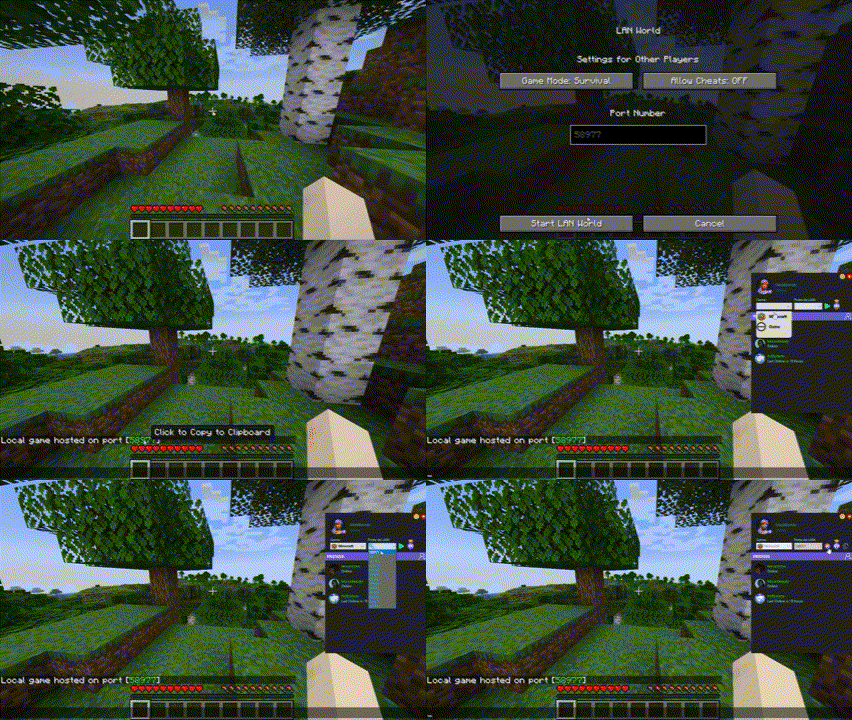
See Hoskes Hoster in action
From opening your Minecraft world to a friend joining from across the country — in three simple steps.
Hoskes Hoster vs VPNs
Why you should choose Hoskes Hoster
 Hoskes Hoster
 Hamachi
 Radmin
Start playing now
Download Hoskes Hoster, sign in and get your first server online in under a minute.
Stay in the loop
Join our community server to connect with other Hoskes users, get support, and stay up to date with news.
ConnectYouTubeWatch tutorials, feature demonstrations, and updates about Hoskes Hoster on our official YouTube channel.
ConnectTikTokFollow us on TikTok for quick tips, fun content, and the latest Hoskes updates in short video format.
Connect